instalar Servicio de escucha de pines GPIO
Creación del Servicio
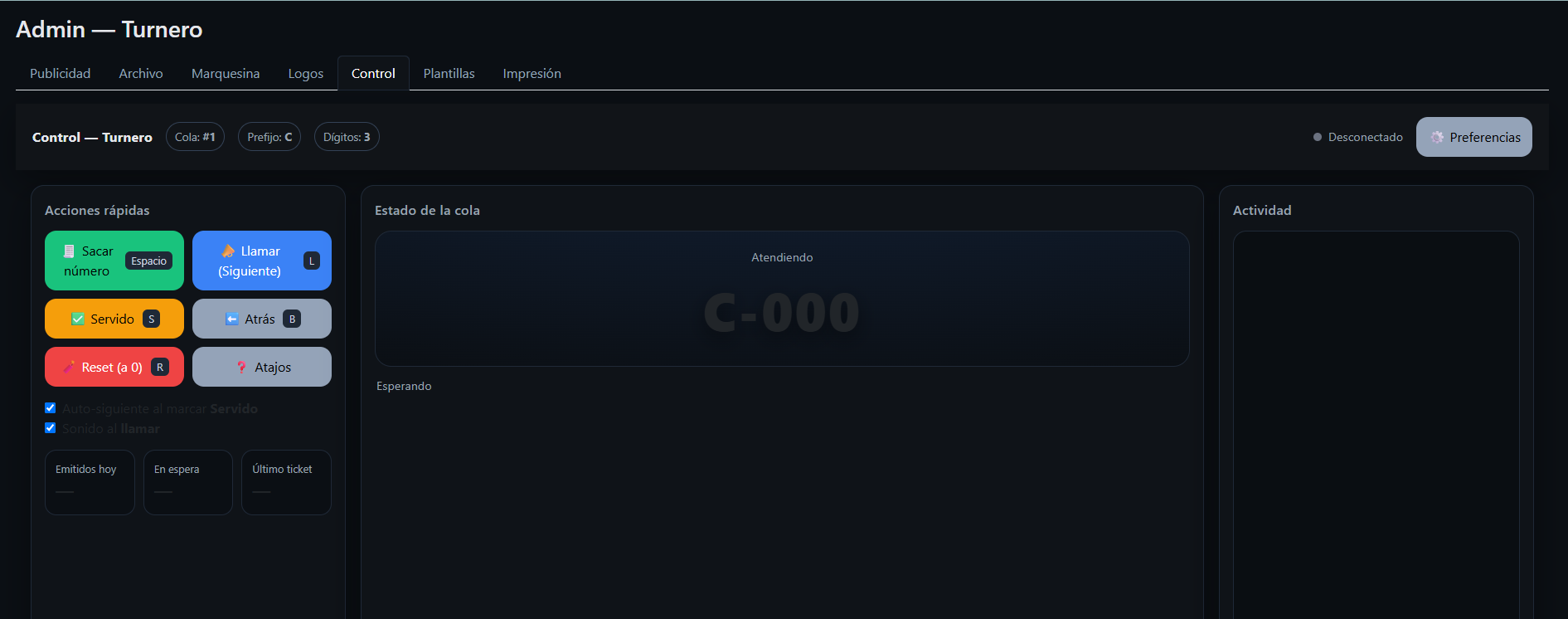
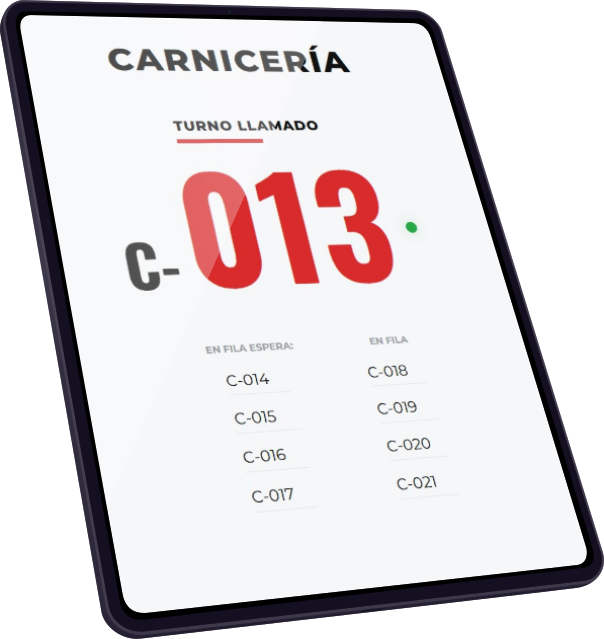
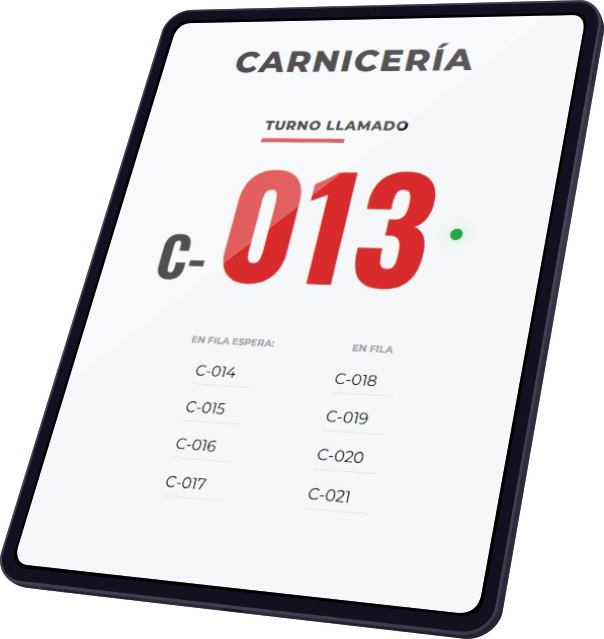
En este artículo aprenderás a instalar y configurar un servicio en Raspberry Pi que escucha los pulsadores conectados a los pines GPIO y envía eventos en tiempo real a la aplicación de turnos.

1. Requisitos
- Una Raspberry Pi (modelos 3/4/5 funcionan bien).
- Sistema operativo Raspberry Pi OS (Bookworm o similar).
- Python 3 instalado (viene por defecto).
- Acceso SSH o terminal.
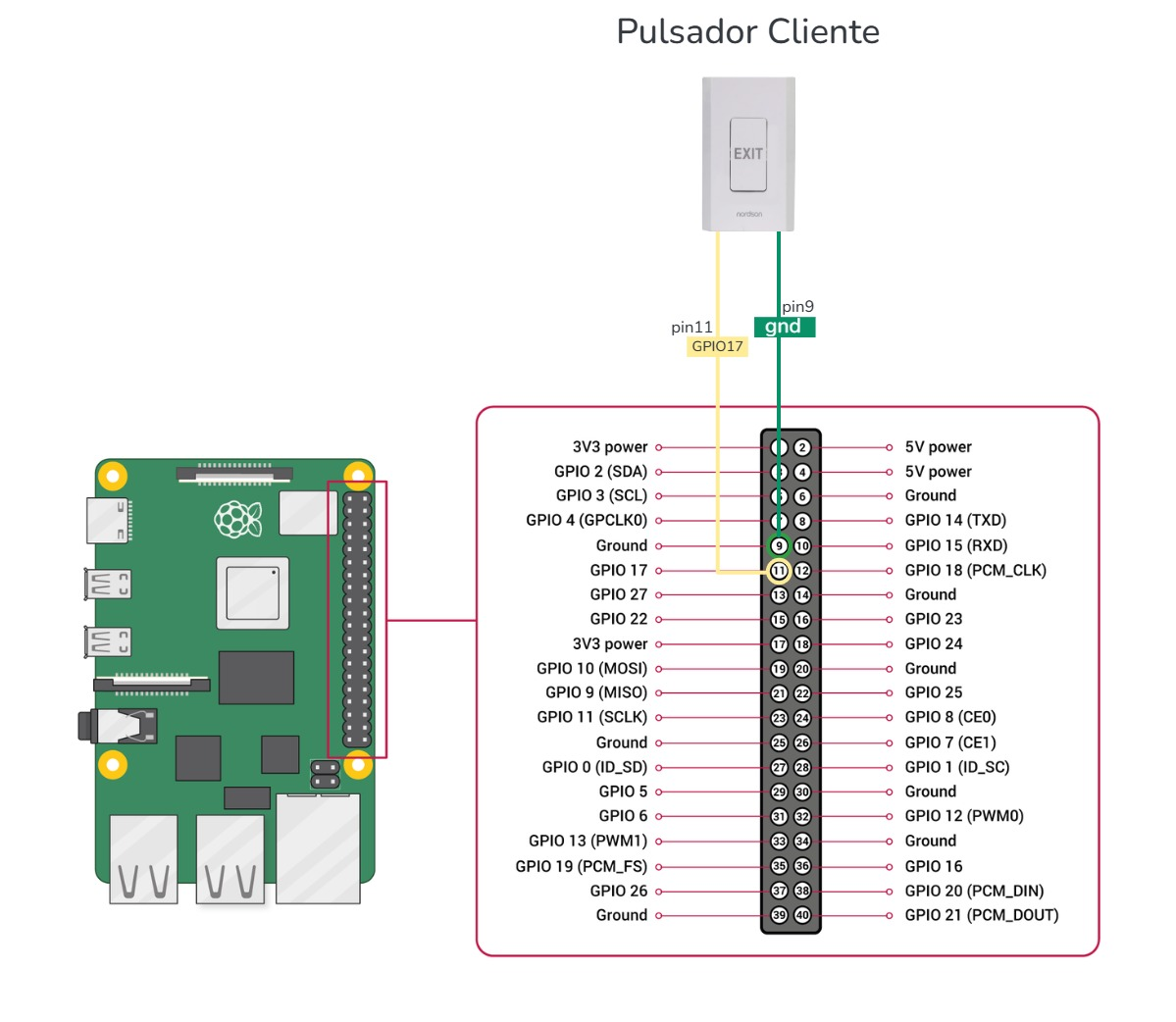
- Pulsadores físicos conectados a los pines GPIO.
Ejemplo:
- Pulsador en GPIO17 → genera un “nuevo turno”.
- Pulsador en GPIO27 → pasa al “siguiente turno”.
- Pulsador en GPIO22 → retrocede al “anterior turno”.
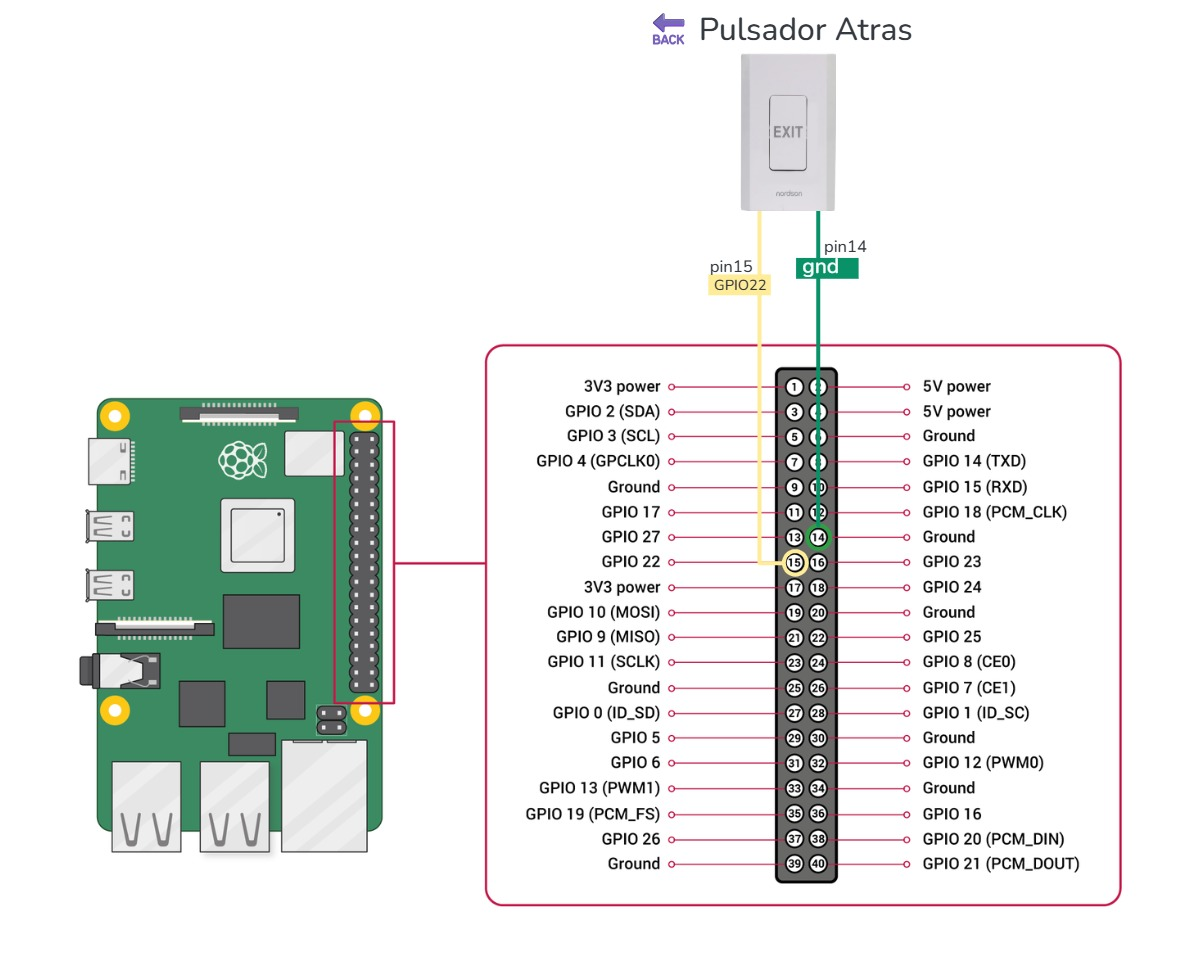

2. Preparar directorio de trabajo
Creamos una carpeta dentro del proyecto turnero:
cd /var/www/html/turnero
sudo mkdir -p tools
cd tools
3. Script Python para leer pulsadores
Guarda este archivo como /tools/gpio_test.py:
#!/usr/bin/env python3
"""
Utilidad de prueba GPIO para Raspberry Pi (script de prueba segura)
Características:
Compatible con RPi.GPIO real cuando esté disponible y con un modo simulado para desarrollo en máquinas que no sean Pi.
Subcomandos: read, write, blink
Opciones: --mode (bcm|board), --mock para forzar el modo simulado
Ejemplos:
# Leer un pin (modo BCM)
sudo python3 tools/gpio_test.py read --pin 17
# Establecer pin en alto
sudo python3 tools/gpio_test.py write --pin 17 --value high
# Hacer parpadear el pin 5 veces, con un intervalo de 0,5 s
sudo python3 tools/gpio_test.py blink --pin 17 --count 5 --interval 0.5
Notas:
Ejecutar como root (sudo) al usar GPIO real en Raspberry Pi. - Si lo ejecuta en Windows o en un equipo sin RPi.GPIO, usará un modo simulado y solo imprimirá acciones.
"""
import argparse
import sys
import time
import os
import json
import urllib.request
import urllib.error
# Try to import RPi.GPIO; fall back to mock if unavailable
REAL_GPIO = False
try:
import RPi.GPIO as GPIO
REAL_GPIO = True
except Exception:
REAL_GPIO = False
class MockGPIO:
BCM = 'BCM'
BOARD = 'BOARD'
OUT = 'OUT'
IN = 'IN'
HIGH = 1
LOW = 0
def __init__(self):
self._mode = None
self._pins = {}
def setwarnings(self, flag):
print(f"[mock] setwarnings({flag})")
def setmode(self, mode):
self._mode = mode
print(f"[mock] setmode({mode})")
def setup(self, pin, mode):
self._pins[pin] = {'mode': mode, 'value': 0}
print(f"[mock] setup(pin={pin}, mode={mode})")
def output(self, pin, value):
if pin not in self._pins:
self.setup(pin, MockGPIO.OUT)
self._pins[pin]['value'] = value
print(f"[mock] output(pin={pin}, value={value})")
def input(self, pin):
val = self._pins.get(pin, {}).get('value', 0)
print(f"[mock] input(pin={pin}) -> {val}")
return val
def cleanup(self):
print("[mock] cleanup()")
self._pins = {}
GPIO_LIB = GPIO if REAL_GPIO else MockGPIO()
def check_root_if_needed(force_mock: bool):
if force_mock:
return
if REAL_GPIO:
# On Unix-like systems ensure running as root for GPIO access
try:
euid = os.geteuid()
if euid != 0:
print("WARNING: Running with RPi.GPIO but not as root: GPIO access may fail. Use sudo.")
except AttributeError:
# os.geteuid not available on Windows
pass
def do_read(pin: int):
GPIO_LIB.setwarnings(False)
GPIO_LIB.setmode(GPIO_LIB.BCM if args.mode == 'bcm' else GPIO_LIB.BOARD)
GPIO_LIB.setup(pin, GPIO_LIB.IN)
val = GPIO_LIB.input(pin)
print(f"PIN {pin} value: {val}")
GPIO_LIB.cleanup()
# optional report
if getattr(args, 'report_url', None):
report_event(args.report_url, pin, 'read:' + str(val))
def do_write(pin: int, value: str):
v = GPIO_LIB.HIGH if value.lower() in ('1', 'true', 'high', 'on') else GPIO_LIB.LOW
GPIO_LIB.setwarnings(False)
GPIO_LIB.setmode(GPIO_LIB.BCM if args.mode == 'bcm' else GPIO_LIB.BOARD)
GPIO_LIB.setup(pin, GPIO_LIB.OUT)
GPIO_LIB.output(pin, v)
print(f"Set pin {pin} -> {value}")
GPIO_LIB.cleanup()
if getattr(args, 'report_url', None):
report_event(args.report_url, pin, 'write:' + value)
def do_blink(pin: int, count: int, interval: float):
GPIO_LIB.setwarnings(False)
GPIO_LIB.setmode(GPIO_LIB.BCM if args.mode == 'bcm' else GPIO_LIB.BOARD)
GPIO_LIB.setup(pin, GPIO_LIB.OUT)
print(f"Blinking pin {pin} {count} times (interval={interval}s)")
try:
for i in range(count):
GPIO_LIB.output(pin, GPIO_LIB.HIGH)
time.sleep(interval)
GPIO_LIB.output(pin, GPIO_LIB.LOW)
time.sleep(interval)
finally:
GPIO_LIB.cleanup()
if getattr(args, 'report_url', None):
report_event(args.report_url, pin, f'blink:{count}')
def report_event(url: str, pin: int, value: str):
payload = json.dumps({'pin': pin, 'value': value}).encode('utf-8')
req = urllib.request.Request(url, data=payload, headers={'Content-Type': 'application/json'})
try:
with urllib.request.urlopen(req, timeout=5) as resp:
resp_data = resp.read().decode('utf-8')
print(f"Reported event to {url}: {resp.status} {getattr(resp,'reason', '')} -> {resp_data}")
except urllib.error.URLError as e:
print(f"Failed to report event to {url}: {e}")
def parse_args(argv):
# Parent parser contains options that should be accepted both before and after the subcommand
parent = argparse.ArgumentParser(add_help=False)
parent.add_argument('--mode', choices=('bcm', 'board'), default=None, help='Pin numbering mode (bcm|board)')
parent.add_argument('--mock', action='store_true', default=None, help='Force mock mode (do not use real GPIO)')
parent.add_argument('--report-url', help='If provided, POST a JSON event to this URL after actions (local endpoint)')
parser = argparse.ArgumentParser(description='GPIO test utility (safe/mode mock)', parents=[parent])
sub = parser.add_subparsers(dest='cmd', required=True)
r = sub.add_parser('read', parents=[parent], help='Read a pin')
r.add_argument('--pin', type=int, required=True, help='Pin number')
w = sub.add_parser('write', parents=[parent], help='Write a pin (high/low)')
w.add_argument('--pin', type=int, required=True, help='Pin number')
w.add_argument('--value', choices=('high', 'low', 'on', 'off', '1', '0'), required=True, help='Value to write')
b = sub.add_parser('blink', parents=[parent], help='Blink a pin N times')
b.add_argument('--pin', type=int, required=True, help='Pin number')
b.add_argument('--count', type=int, default=3, help='How many times to blink')
b.add_argument('--interval', type=float, default=0.5, help='Seconds between toggles')
m = sub.add_parser('monitor', parents=[parent], help='Monitor one or more pins and report changes')
m.add_argument('--pin', type=int, nargs='+', required=True, help='Pin number(s) to monitor')
m.add_argument('--interval', type=float, default=0.2, help='Polling interval for mock mode (seconds)')
m.add_argument('--debounce', type=int, default=50, help='Debounce window in ms for change suppression')
m.add_argument('--duration', type=float, default=None, help='Optional duration to run in seconds (useful for tests)')
# Parse and normalize: prefer subparser-provided mode/mock, fall back to top-level, then default values.
args = parser.parse_args(argv)
if getattr(args, 'mode', None) is None:
args.mode = 'bcm'
if getattr(args, 'mock', None) is None:
args.mock = False
return args
def do_monitor(pins, interval=0.2, debounce_ms=50, duration=None, report_url=None):
"""Monitor pins for changes. In real mode uses RPi.GPIO event detect; in mock mode polls."""
print(f"Starting monitor on pins: {pins} (mock={args.mock}) interval={interval}s debounce={debounce_ms}ms duration={duration})")
if not isinstance(pins, (list, tuple)):
pins = [pins]
if not args.mock and REAL_GPIO:
# Real GPIO event detection
try:
GPIO_LIB.setwarnings(False)
GPIO_LIB.setmode(GPIO_LIB.BCM if args.mode == 'bcm' else GPIO_LIB.BOARD)
for p in pins:
GPIO_LIB.setup(p, GPIO_LIB.IN)
def cb_factory(pin):
def cb(channel):
try:
val = GPIO_LIB.input(pin)
print(f"Event pin {pin}: {val}")
if report_url:
report_event(report_url, pin, f'event:{val}')
except Exception as e:
print('Callback error:', e)
return cb
use_polling = False
for p in pins:
# add both edge detection
try:
GPIO_LIB.add_event_detect(p, GPIO_LIB.BOTH if hasattr(GPIO_LIB, 'BOTH') else GPIO_LIB.RISING, callback=cb_factory(p), bouncetime=debounce_ms)
except RuntimeError as e:
# fallback to polling if kernel or permissions prevent event detect
print(f"add_event_detect failed for pin {p}: {e}; falling back to polling")
use_polling = True
break
if not use_polling:
# run until duration or KeyboardInterrupt (event-detect mode)
start = time.time()
try:
while True:
time.sleep(1)
if duration and (time.time() - start) >= duration:
break
except KeyboardInterrupt:
pass
else:
# Switch to polling mode using GPIO input reads
print('Switching to polling mode due to add_event_detect failure')
last = {}
try:
for p in pins:
try:
last[p] = GPIO_LIB.input(p)
except Exception:
last[p] = 0
start = time.time()
while True:
for p in pins:
try:
v = GPIO_LIB.input(p)
except Exception:
v = 0
if last.get(p) is None:
last[p] = v
elif v != last[p]:
print(f"Change detected pin {p}: {last[p]} -> {v}")
last[p] = v
if report_url:
report_event(report_url, p, f'poll:{v}')
if duration and (time.time() - start) >= duration:
break
time.sleep(interval)
except KeyboardInterrupt:
pass
finally:
try:
for p in pins:
if hasattr(GPIO_LIB, 'remove_event_detect'):
GPIO_LIB.remove_event_detect(p)
except Exception:
pass
GPIO_LIB.cleanup()
print('Monitor stopped')
else:
# Mock or no RPi.GPIO available: polling loop
last = {p: None for p in pins}
start = time.time()
try:
while True:
for p in pins:
try:
v = GPIO_LIB.input(p)
except Exception:
v = 0
if last[p] is None:
last[p] = v
elif v != last[p]:
# simple debounce by time
print(f"Change detected pin {p}: {last[p]} -> {v}")
last[p] = v
if report_url:
report_event(report_url, p, f'mock:{v}')
if duration and (time.time() - start) >= duration:
break
time.sleep(interval)
except KeyboardInterrupt:
pass
print('Monitor stopped (mock)')
if __name__ == '__main__':
args = parse_args(sys.argv[1:])
# If user forced mock, override
if args.mock and REAL_GPIO:
print("Forcing mock mode (--mock) despite having RPi.GPIO available.")
GPIO_LIB = MockGPIO()
check_root_if_needed(force_mock=args.mock)
# If REAL_GPIO but GPIO_LIB is Mock due to above reassignment, ensure reference exists
if isinstance(GPIO_LIB, MockGPIO):
# already ok
pass
if args.cmd == 'read':
do_read(args.pin)
elif args.cmd == 'write':
do_write(args.pin, args.value)
elif args.cmd == 'blink':
do_blink(args.pin, args.count, args.interval)
elif args.cmd == 'monitor':
# monitor one or more pins
do_monitor(args.pin, interval=args.interval, debounce_ms=args.debounce, duration=args.duration, report_url=args.report_url)
else:
print('Unknown command')
sys.exit(2)
Hazlo ejecutable:
sudo chmod +x gpio_test.py
4. Script PHP receptor de eventos
4.1 - En la carpeta tools/, crea gpio_report.php:
nano /tools/gpio_report.php
<?php
declare(strict_types=1);
/**
* tools/gpio_report.php
*
* Recibe eventos GPIO SOLO de localhost, los loguea y cuando detecta “pulsación”
* llama a la API del turnero para emitir siguiente turno, y luego imprime con print_ticket.php.
*
* Prioriza POST a /api/botones/siguiente.php (si existe y responde ok),
* si no, intenta POST a /api/queues_next.php (mismo contrato de prefix).
*
* Además: cooldown por pin y soporte para valores "poll:0" (pull-up) o "pressed".
*/
// ───────────────────────── Seguridad ─────────────────────────
$remote = $_SERVER['REMOTE_ADDR'] ?? '';
if (!in_array($remote, ['127.0.0.1', '::1'], true)) {
http_response_code(403);
header('Content-Type: application/json; charset=utf-8');
echo json_encode(['ok'=>false,'error'=>'Forbidden - only local clients allowed']);
exit;
}
// ───────────────────────── Entrada ─────────────────────────
$pin = null;
$value = null;
if (!empty($_POST)) {
$pin = isset($_POST['pin']) ? (int)$_POST['pin'] : null;
$value = $_POST['value'] ?? null;
} else {
$raw = file_get_contents('php://input');
if ($raw) {
$json = json_decode($raw, true);
if (json_last_error() === JSON_ERROR_NONE && is_array($json)) {
$pin = isset($json['pin']) ? (int)$json['pin'] : $pin;
$value = $json['value'] ?? $value;
}
}
}
if ($pin === null) {
http_response_code(400);
header('Content-Type: application/json; charset=utf-8');
echo json_encode(['ok'=>false,'error'=>'Missing pin']);
exit;
}
if ($value === null) $value = 'pressed';
$event = [
'pin' => $pin,
'value' => (string)$value,
'ts' => time(),
'ts_iso' => date('c')
];
// ───────────────────────── Log de eventos ─────────────────────────
$dataFile = __DIR__ . '/gpio_events.json';
$events = [];
if (is_file($dataFile)) {
$raw = file_get_contents($dataFile);
$decoded = json_decode($raw, true);
if (json_last_error() === JSON_ERROR_NONE && is_array($decoded)) $events = $decoded;
}
array_unshift($events, $event);
$events = array_slice($events, 0, 100);
file_put_contents($dataFile, json_encode($events, JSON_PRETTY_PRINT | JSON_UNESCAPED_UNICODE));
// ───────────────────────── Cooldown por pin ─────────────────────────
$COOLDOWN_MS = 800; // ajustá si hace falta
$stateDir = '/var/lib/turnero';
if (!is_dir($stateDir)) @mkdir($stateDir, 0775, true);
$lastFireFile = $stateDir . '/last_fire_pin_' . $pin . '.txt';
$nowMs = (int) floor(microtime(true) * 1000);
$lastMs = is_file($lastFireFile) ? (int) @file_get_contents($lastFireFile) : 0;
$delta = $nowMs - $lastMs;
// ───────────────────────── Disparo emisión+impresión ─────────────────────────
$val = strtolower((string)$value);
$didTrigger = false;
$emitResp = null;
$printResp = null;
/**
* Consideramos “pulsación” cuando:
* - value == 'pressed'
* - value == '1'
* - contiene 'event:1'
* - contiene 'poll:0' (pull-up → presionar lleva el pin a 0)
* (si usás pull-down, cambia a 'poll:1')
*/
$looksPressed =
$val === 'pressed' ||
$val === '1' ||
strpos($val, 'event:1') !== false ||
strpos($val, 'poll:0') !== false; // <- cámbialo a 'poll:1' si tu botón es pull-down
if ($looksPressed && $delta > $COOLDOWN_MS) {
// Guardamos timestamp de disparo
@file_put_contents($lastFireFile, (string)$nowMs);
// Mapa pin → prefijo (ajustá a tus sectores reales)
$prefixByPin = [
17 => 'C',
27 => 'P',
22 => 'F',
];
$prefix = $prefixByPin[$pin] ?? 'C';
// 1) Emitir siguiente turno usando TU API (POST)
$base = 'http://127.0.0.1/turnero/api';
$emitEndpoints = [
$base . '/botones/siguiente.php',
$base . '/queues_next.php',
];
$emitJson = null; $emitTried = []; $emitOk = false;
foreach ($emitEndpoints as $url) {
$emitTried[] = $url;
$ctx = stream_context_create([
'http' => [
'method' => 'POST',
'header' => "Content-Type: application/x-www-form-urlencoded\r\n",
'content' => http_build_query(['prefix' => $prefix]),
'timeout' => 6,
]
]);
$raw = @file_get_contents($url, false, $ctx);
$j = json_decode($raw ?? 'null', true);
if (is_array($j) && !empty($j)) { $emitJson = $j; }
// criterio flexible de éxito: ok==true o tenga ticket o n
if (is_array($j) && ( ($j['ok'] ?? false) || !empty($j['ticket']) || isset($j['n']) )) {
$emitOk = true; break;
}
}
$emitResp = $emitJson ?? ['tried'=>$emitTried,'raw'=>'no-json'];
// Parsear ticket/prefix/n
$ticket = null; $pref = $prefix; $n = null;
if (is_array($emitJson)) {
if (!empty($emitJson['ticket']) && is_string($emitJson['ticket'])) {
$ticket = $emitJson['ticket'];
if (preg_match('/^([A-Z0-9\-]+)-(\d{1,3})$/i', $ticket, $m)) {
$pref = strtoupper($m[1]);
$n = (int)$m[2];
}
}
if ($n === null) {
if (isset($emitJson['n'])) $n = (int)$emitJson['n'];
if (!empty($emitJson['prefix'])) $pref = preg_replace('/[^A-Z0-9\-]/i','', (string)$emitJson['prefix']);
if ($n !== null && $ticket === null) $ticket = sprintf('%s-%03d', $pref, $n);
}
}
if ($n === null && is_string($ticket) && preg_match('/^([A-Z0-9\-]+)-(\d{1,3})$/i', $ticket, $mm)) {
$pref = strtoupper($mm[1]); $n = (int)$mm[2];
}
// 2) Imprimir si tenemos prefijo + número
if ($n !== null) {
$printUrl = 'http://127.0.0.1/turnero/print_ticket.php?prefix=' . urlencode($pref) . '&n=' . $n;
$ctxP = stream_context_create(['http'=>['method'=>'GET','timeout'=>8]]);
$praw = @file_get_contents($printUrl, false, $ctxP);
$pjs = json_decode($praw ?? 'null', true);
$printResp = is_array($pjs) ? $pjs : ['raw'=>$praw];
}
$didTrigger = true;
}
// ───────────────────────── Respuesta ─────────────────────────
header('Content-Type: application/json; charset=utf-8');
echo json_encode([
'ok' => true,
'event' => $event,
'cooldown_ms' => $COOLDOWN_MS,
'triggered' => $didTrigger,
'emit' => $emitResp,
'print' => $printResp
]);
4.2 - Esto guarda cada evento en /tools/gpio_events.json y responde con JSON.
tail -f /tools/gpio_events.json
{
"pin": 17,
"value": "poll:0",
"ts": 1759339006,
"ts_iso": "2025-10-01T17:16:46+00:00"
},
{
"pin": 27,
"value": "poll:0",
"ts": 1759339006,
"ts_iso": "2025-10-01T17:16:46+00:00"
},
5. Servicio systemd para ejecutar el monitor
5.1 - Creamos gpio_buttons.service:
nano /etc/systemd/system/gpio_buttons.service
[Unit]
Description=Turnero GPIO Buttons (3 procesos, pull-up)
After=network.target

[Service]
Type=simple
User=root
WorkingDirectory=/var/www/html/turnero/pi
Environment=PYTHONUNBUFFERED=1
ExecStart=/bin/bash -lc '\
  /usr/bin/python3 monitor_pullup_multi.py --pin 17 --debounce 200 --report-url http://127.0.0.1/turnero/pi/gpio_dispatch.php & \
  /usr/bin/python3 monitor_pullup_multi.py --pin 27 --debounce 200 --report-url http://127.0.0.1/turnero/pi/gpio_dispatch.php & \
  /usr/bin/python3 monitor_pullup_multi.py --pin 22 --debounce 200 --report-url http://127.0.0.1/turnero/pi/gpio_dispatch.php & \
  wait'
Restart=always
RestartSec=1

[Install]
WantedBy=multi-user.target
5.2 - Copiar el archivo de servicio, a la ruta de servicios:
sudo cp gpio_buttons.service /etc/systemd/system/
5.3 - Reiniciar Servicios o Demonios de linux
sudo systemctl daemon-reload
5.4 - Habilito el archivo como un servicio de linux
sudo systemctl enable --now gpio_buttons.service
6. Verificar el servicio
6.1 - Revisar estado:
systemctl status gpio_monitor.service --no-pager
6.2 - Ver logs en vivo:
journalctl -u gpio_monitor.service -f
6.3 - Al presionar los pulsadores deberías ver eventos tipo:
Change detected: {'pin': 17, 'value': 'event:0', 'ts': 1695992137}
Reported: 200 {"ok":true,"event":{"pin":17,"value":"event:0","queue":1,"ts":...}}
7. Integración con la App
Los eventos que recibe gpio_report.php se redirigen a los endpoints de tu aplicación de turnos, por ejemplo:
- pin 17 → /api/botones/nuevo.php
- pin 27 → /api/botones/siguiente.php
- pin 22 → /api/botones/anterior.php
Esto se ajusta en gpio_dispatch.php (router PHP) para que cada pulsación actúe igual que si lo hubieras hecho desde la interfaz web.
✅ Raspberry Pi ya escucha pulsadores físicos y los traduce en acciones de turnos en tiempo real en la pantalla.
No hay comentarios por ahora.
para ser el primero en comentar.